[NOTE] Updated September 27, 2022. This article may have outdated content or subject matter.
1.路由参数
1.1 Param
当注册路由格式为:/path/:a/:b 时,:x指的就是路由参数,可以直接通过Param("x")获取值信息。
a.代码示例:
 1
 2
 3
 4
 5
 6
 7
 8
 9
10
11
12
13
14
15
16
17
18
19
20
21
22
23
24
25
26
27
28
29
30
31
32
33
34
35
36
37
|
package main
import (
	"github.com/gin-gonic/gin" // 引入Gin框架
)
func main() {
	// 创建一个默认的路由引擎
	engine := gin.Default()
	// 注册路由
	engine.GET("/test/:name", func(context *gin.Context) {
		// 接收参数
		name := context.Param("name")
		context.JSON(200, gin.H{"msg": "success", "name": name})
	})
	engine.GET("/test/:name/:age", func(context *gin.Context) {
		// 接收参数
		name := context.Param("name")
		age := context.Param("age")
		context.JSON(200, gin.H{
			"msg": "success",
			"name": name,
			"phone":age,
		})
	})
	engine.GET("/test/:name/:age/:height", func(context *gin.Context) {
		// 接收参数
		name := context.Param("name")
		age := context.Param("age")
		height := context.Param("height")
		context.JSON(200, gin.H{
			"msg": "success",
			"name": name,
			"phone":age,
			"height":height,
		})
	})
	_ = engine.Run()
}
|
b.请求返回:
1
2
3
4
5
6
|
➜ curl -X GET http://127.0.0.1:8080/test/张三
{"msg":"success","name":"张三"}
➜ curl -X GET http://127.0.0.1:8080/test/张三/18
{"msg":"success","name":"张三","phone":"18"}
➜ curl -X GET http://127.0.0.1:8080/test/张三/18/170
{"height":"170","msg":"success","name":"张三","phone":"18"}
|
2.GET参数
2.1 接收单值
在Gin框架中可以通过Query、DefaultQuery、GetQuery来获取Get参数信息,而Query、DefaultQuery是对GetQuery的二次封装。
a.代码示例:
 1
 2
 3
 4
 5
 6
 7
 8
 9
10
11
12
13
14
15
16
17
18
19
20
21
22
23
24
25
26
27
28
|
package main
import (
	"github.com/gin-gonic/gin" // 引入Gin框架
)
func main() {
	// 创建一个默认的路由引擎
	engine := gin.Default()
	// 注册路由
	testReceiveGetParam(engine)
	_ = engine.Run()
}
func testReceiveGetParam( engine *gin.Engine)  {
	engine.GET("/receive", func(context *gin.Context) {
		// 如果不存在或为空,则返回:""
		name := context.Query("name")
		// 如果不存在或为空,则返回默认值
		age := context.DefaultQuery("age","18")
		// 直接使用GetQuery
		home, ok := context.GetQuery("home")
		context.PureJSON(200,gin.H{
			"msg":"success",
			"context.Query->name":name,
			"context.DefaultQuery->age":age,
			"context.GetQuery->home":home,
			"context.GetQuery->ok":ok,
		})
	})
}
|
c.请求返回:
1
2
3
4
5
6
|
# 不传任何参数时,看接收情况
➜ curl -X GET http://127.0.0.1:8080/receive
{"context.DefaultQuery->age":"18","context.GetQuery->ok":false,"context.GetQuery->home":"","context.Query->name":"","msg":"success"}
# 传任何参数时,看接收情况
➜ curl -X GET http://127.0.0.1:8080/receive\?age\=23\&home\=北京\&name\=小明
{"context.DefaultQuery->age":"23","context.GetQuery->ok":true,"context.GetQuery->home":"北京","context.Query->name":"小明","msg":"success"}
|
2.2 接收数组
在Gin框架中可以通过QueryArray("param[]")和GetQueryArray("param[]")获取GET方式提交中的数组值信息,而QueryArray是对GetQueryArray二次封装, 具体使用参考下面代码:
a.代码示例:
 1
 2
 3
 4
 5
 6
 7
 8
 9
10
11
12
13
14
15
16
17
18
19
20
21
22
23
24
|
//-------- main.go ---------------
package main
import (
	"github.com/gin-gonic/gin" // 引入Gin框架
	"go-use/practise" // 代码示例包
)
func main() {
	// 创建一个默认的路由引擎
	engine := gin.Default()
	// 注册路由
	practise.TestReceiveGetArrayParam(engine)
	_ = engine.Run()
}
//------ go-use/practise/param_receice.go -------
// 接收数组
func TestReceiveGetArrayParam(engine *gin.Engine)  {
	engine.GET("/getArr", func(context *gin.Context) {
		// 接收GET数组:/getArr?name[]=张三&name[]=李四
		nameList := context.QueryArray("name[]")
		context.JSON(200,gin.H{
			"arr": nameList,
		})
	})
}
|
b.请求返回:
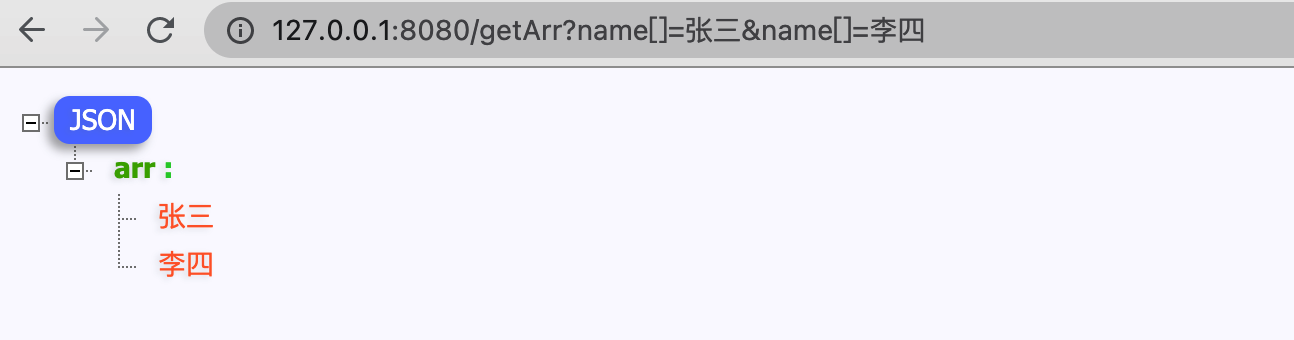
2.3 接收Map
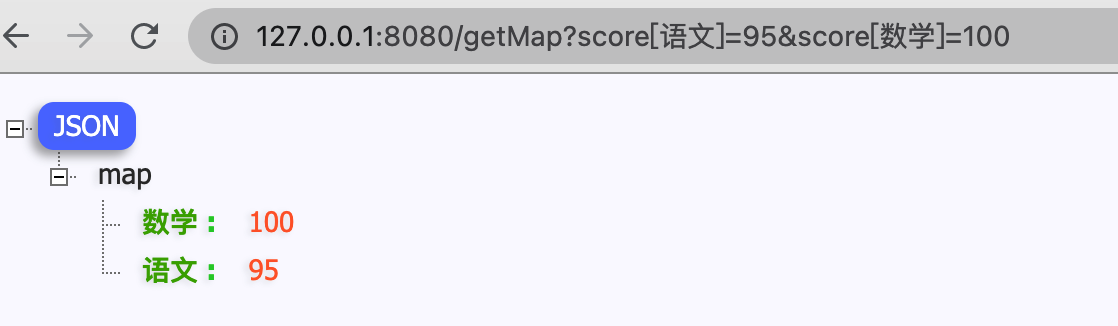
在Gin框架中可以通过QueryMap("param")和GetQueryMap("param")获取GET方式提交中的map值信息,而QueryMap是对GetQueryMap二次封装,具体使用参考下面代码:
a.代码示例:
 1
 2
 3
 4
 5
 6
 7
 8
 9
10
11
12
13
14
15
16
17
18
19
20
21
22
23
24
25
|
//-------- main.go ---------------
package main
import (
	"github.com/gin-gonic/gin" // 引入Gin框架
	"go-use/practise" // 代码示例包
)

func main() {
	// 创建一个默认的路由引擎
	engine := gin.Default()
	// 注册路由
	practise.TestRecGetMapParam(engine)
	_ = engine.Run()
}
//------ go-use/practise/param_receice.go -------
// 接收map
func TestRecGetMapParam(engine *gin.Engine)  {
	engine.GET("/getMap", func(context *gin.Context) {
		//接收GET map:/getMap?score[语文]=95&score[数学]=100
		queryMap := context.QueryMap("score")
		context.JSON(200,gin.H{
			"map":queryMap,
		})
	})
}
|
b.请求返回:
3.POST参数
3.1 接收单值
在Gin框架中可以通过PostForm、DefaultPostForm、GetPostForm来获取Post提交的参数信息,而PostForm、DefaultPostForm同样是对GetPostForm的二次封装。
a.代码示例:
 1
 2
 3
 4
 5
 6
 7
 8
 9
10
11
12
13
14
15
16
17
18
19
20
21
22
23
24
25
26
27
28
|
//-------- main.go ---------------
package main
import (
	"github.com/gin-gonic/gin"
	"go-use/practise"
)
func main() {
	// 创建一个默认的路由引擎
	engine := gin.Default()
	// 注册路由
	practise.TestRecPostSingleValue(engine)
	_ = engine.Run()
}
//------ go-use/practise/param_receice.go -------
// 接收单值: PostForm、DefaultPostForm、GetPostForm
func TestRecPostSingleValue(engine *gin.Engine) {
	engine.POST("/postSingle", func(context *gin.Context) {
		name := context.PostForm("name")
		age := context.DefaultQuery("age", "22")
		home, ok := context.GetPostForm("home")
		context.JSON(200, gin.H{
			"postForm":         name,
			"DefaultQuery":     age,
			"GetPostForm.home": home,
			"GetPostForm.ok":   ok,
		})
	})
}
|
b.请求返回:
1
2
3
4
5
6
7
|
# 不传任何参数时,看接收情况
➜ curl -X POST http://127.0.0.1:8080/postSingle
{"DefaultQuery":"22","GetPostForm.home":"","GetPostForm.ok":false,"postForm":""}

# 传任何参数时,看接收情况
➜  ~  curl -X POST http://127.0.0.1:8080/postSingle -d "age=40&home=南京&name=张三"
{"DefaultQuery":"22","GetPostForm.home":"南京","GetPostForm.ok":true,"postForm":"张三"}
|
3.2 接收数组
在Gin框架中可以通过PostFormArray("param[]")和GetPostFormArray("param[]")获取POST方式提交中的数组值信息,而PostFormArray是对GetPostFormArray二次封装,具体使用参考下面代码:
a.代码示例:
 1
 2
 3
 4
 5
 6
 7
 8
 9
10
11
12
13
14
15
16
17
18
19
20
21
22
23
|
//-------- main.go ---------------
package main
import (
	"github.com/gin-gonic/gin"
	"go-use/practise"
)
func main() {
	// 创建一个默认的路由引擎
	engine := gin.Default()
	// 注册路由
	practise.TestRecPostArrValue(engine)
	_ = engine.Run()
}
//------ go-use/practise/param_receice.go -------
// 接收POST提交的数组
func TestRecPostArrValue(engine *gin.Engine) {
	engine.POST("/postArr", func(context *gin.Context) {
		arr := context.PostFormArray("name")
		context.JSON(200, gin.H{
			"postArr": arr,
		})
	})
}
|
b.请求返回:
1
2
|
➜ curl -X POST http://127.0.0.1:8080/postArr -d "name[]=张三&name[]=李东"
{"postArr":["张三","李东"]}
|
3.3 接收Map
在Gin框架中可以通过PostFormMap("param")和GetPostFormMap("param")获取POST方式提交中的映射(map)信息,具体使用参考下面代码:
a.代码示例:
 1
 2
 3
 4
 5
 6
 7
 8
 9
10
11
12
13
14
15
16
17
18
19
20
21
|
//--- main.go ---------------
package main
import (
	"github.com/gin-gonic/gin"
	"go-use/practise"
)
func main() {
	// 创建一个默认的路由引擎
	engine := gin.Default()
	// 注册路由
	practise.TestRecPostMapValue(engine)
	_ = engine.Run()
}
//--- go-use/practise/param_receice.go -------
// 接收POST提交的Map信息
func TestRecPostMapValue(engine *gin.Engine)  {
	engine.POST("/postMap", func(context *gin.Context) {
		formMap := context.PostFormMap("score")
		context.JSON(200,gin.H{"map":formMap})
	})
}
|
b.请求返回:
1
2
|
➜ curl -X POST http://127.0.0.1:8080/postMap -d "score[语文]=100&score[数学]=100"
{"map":{"数学":"100","语文":"100"}}
|
3.4 接收JSON
在Gin框架中可以通过BindJSON(¶m)来接收提交的json格式数据,具体使用参考下面代码:
1.直接赋值
a.代码示例:
 1
 2
 3
 4
 5
 6
 7
 8
 9
10
11
12
13
14
15
16
17
18
19
20
21
22
23
24
25
26
|
//--- main.go ---------------
package main
import (
"github.com/gin-gonic/gin"
"go-use/practise"
)
func main() {
// 创建一个默认的路由引擎
engine := gin.Default()
// 注册路由
practise.TestRecPostJson(engine)
_ = engine.Run()
}
//--- go-use/practise/param_receice.go -------
// 方式一: 将接收POST提交的JSON,直接赋值给变量
func TestRecPostJson(engine *gin.Engine) {
engine.POST("/postJson", func(context *gin.Context) {
param := make(map[string]interface{})
err := context.BindJSON(¶m)
if err != nil {
context.JSON(500, gin.H{"err": err})
return
}
context.JSON(200, gin.H{"return": param})
})
}
|
b.请求返回:
1
2
3
4
5
6
7
8
|
# 请求
➜ curl -X POST http://127.0.0.1:8080/postJson -d '{
   "name":"张三",
   "age":20,
   "likes":["打游戏","旅游"]
}'
# 返回
{"return":{"age":20,"likes":["打游戏","旅游"],"name":"张三"}}
|
2.绑定到结构体
a.代码示例:
 1
 2
 3
 4
 5
 6
 7
 8
 9
10
11
12
13
14
15
16
17
18
19
20
21
22
23
24
25
26
27
28
29
30
31
|
//--- main.go ---------------
package main
import (
	"github.com/gin-gonic/gin"
	"go-use/practise"
)
func main() {
	// 创建一个默认的路由引擎
	engine := gin.Default()
	// 注册路由
	practise.TestRecPostJson2(engine)
	_ = engine.Run()
}
//--- go-use/practise/param_receice.go -------
// 定义被绑定的结构体
type People struct {
	Name  string   `json:"name"`
	Age   int      `json:"age"`
	Likes []string `json:"likes"`
}
// 方式二: 将接收POST提交的JSON,绑定到结构体
func TestRecPostJson2(engine *gin.Engine) {
	engine.POST("/postJson2", func(context *gin.Context) {
		people := &People{}
		err := context.BindJSON(&people)
		if err != nil {
			context.JSON(500, gin.H{"err": err})
		}
		context.JSON(200, gin.H{"return": people})
	})
}
|
请求和返回同上。